Appearance
Dashboard
The Dashboard is the central command center of the CointMU application. It aggregates real-time wallet balances, node synchronization status, network health metrics, and transaction history into a single unified view — all fetched directly via the embedded JSON-RPC node.
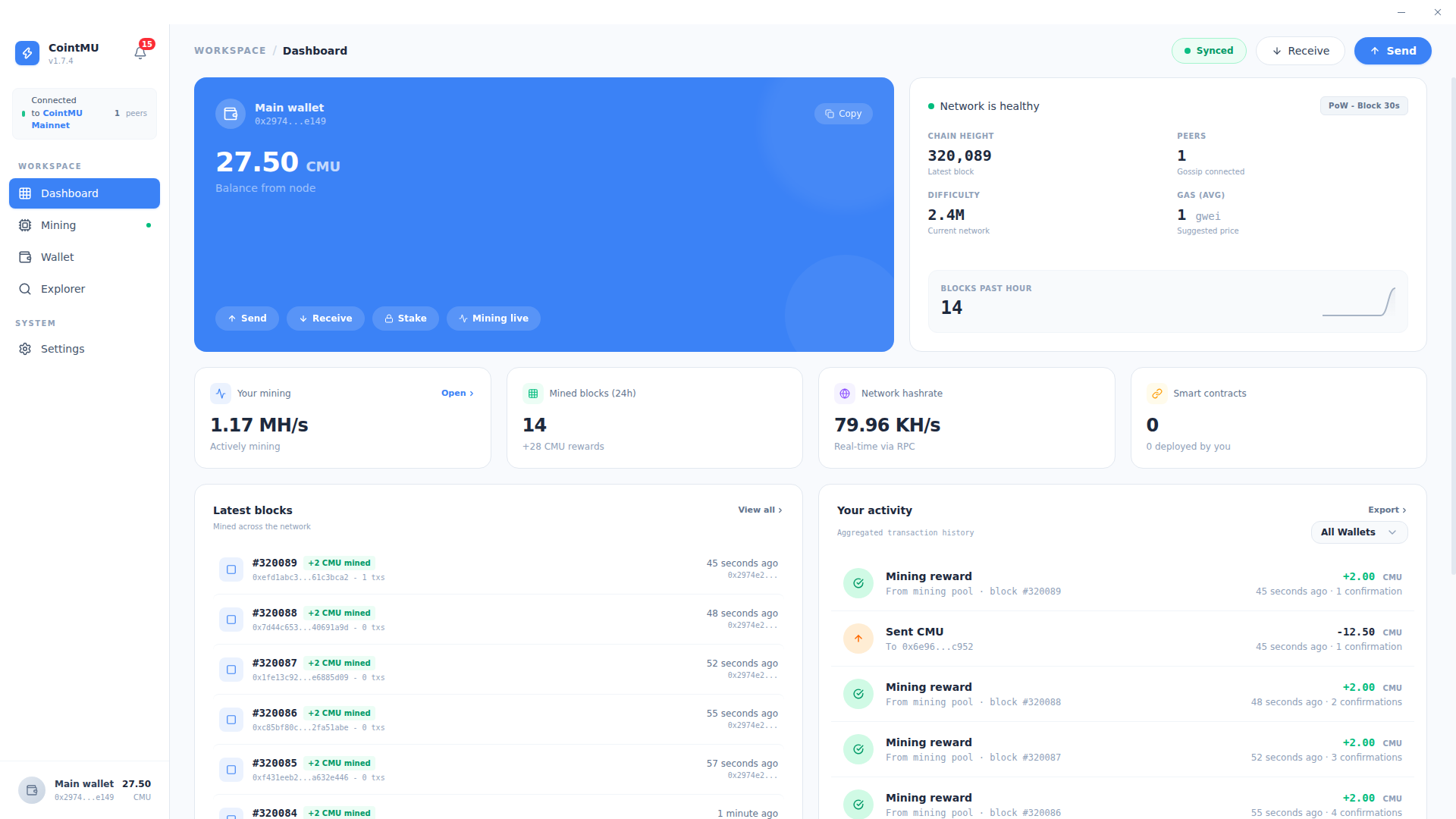
The header shows Synced while the app can reach the local node, or Offline when it cannot, with Receive and Send buttons that open those dialogs on the Wallet page. Synced only means the local node answers; it does not check peers or chain height.
Main Wallet Panel
The wallet panel displays the active primary account connected to the local node.
| Element | Description |
|---|---|
| Live Balance | Current CMU balance fetched directly from the node (e.g., 9,076.06 CMU). |
| Public Address | Truncated wallet address with a one-click copy function. |
| Quick Actions | Send and Receive open the same dialogs as the header buttons, and Mining live opens the Mining page. Up to 1.7.4 none of them did anything. |
The Stake button was removed in 1.8.0: CointMU is a proof-of-work chain and has no staking.
The eye button in the title bar turns Privacy mode on and off: balances and amounts then show as ••••, here and on the other pages. See Settings → Appearance.
Network Health
The network health panel monitors the real-time consensus state of the CointMU blockchain.
| Metric | Description |
|---|---|
| Network Status | Network is healthy while the local node answers RPC, Network is disconnected when it does not, plus the consensus line (PoW - Block 30s). It is shown even with 0 peers. |
| Chain Height | The latest block number confirmed and appended to the chain. |
| Peers | Number of active gossip connections communicating with the local node. |
| Difficulty | Current cryptographic mining difficulty, automatically adjusted by the network protocol. |
| Gas (AVG) | Suggested gas price in gwei for efficient transaction execution. |
| Blocks Past Hour | Block production rate over the last hour, visualized as a sparkline chart. |
Node Telemetry
The telemetry row provides a snapshot of local mining participation and on-chain deployment activity.
| Metric | Description |
|---|---|
| Your Mining | Personal hashrate in MH/s and current miner status (e.g., Miner idle). |
| Mined Blocks (24h) | Number of blocks mined and total CMU rewards earned in the last 24 hours. |
| Network Hashrate | Aggregate computational power of the entire CointMU network in KH/s, fetched in real-time via RPC. |
| Smart Contracts | Total number of smart contracts deployed from the active address. |
Select Open on the Your Mining card to go to the Mining page.
Latest Blocks
The Latest Blocks feed displays a live, network-wide list of the most recently mined blocks.
Each entry includes:
- Block height and miner reward (e.g.,
+2 CMU mined). - Block hash (truncated) and transaction count.
- Timestamp relative to the current time.
- Miner address responsible for the block.
Select View all to navigate to the full block list in the Explorer.
Your Activity
The Your Activity panel aggregates the transaction history for all connected wallets.
- Displays incoming mining rewards, outbound transfers, and confirmation counts, 10 entries per page.
- Filterable by wallet using the All Wallets dropdown.
- Select Export to download the full history as
cointmu-activity.csv. - With no history yet, it shows No activity yet — Start mining to see rewards.
TIP
The activity feed is refreshed every 30 seconds in the background, keeping the list current without requiring a manual page refresh.